
Recruitment CRM for Small Agencies in India: What to Look For
For a 5–15 person Indian agency, the right recruitment CRM is the one that gets candidates out of Excel, inboxes and WhatsApp into one de-duplicated, searchable database, runs a separate pipeline for every client mandate, and tracks each placement through to the invoice. Most agency tools now combine an ATS and a CRM, so the real test is whether a tool handles your channels, your search and your billing without workarounds. Use the checklist and the ten demo questions below on any tool you shortlist, including ours.
Recruitment CRM vs ATS: which does an agency actually need?
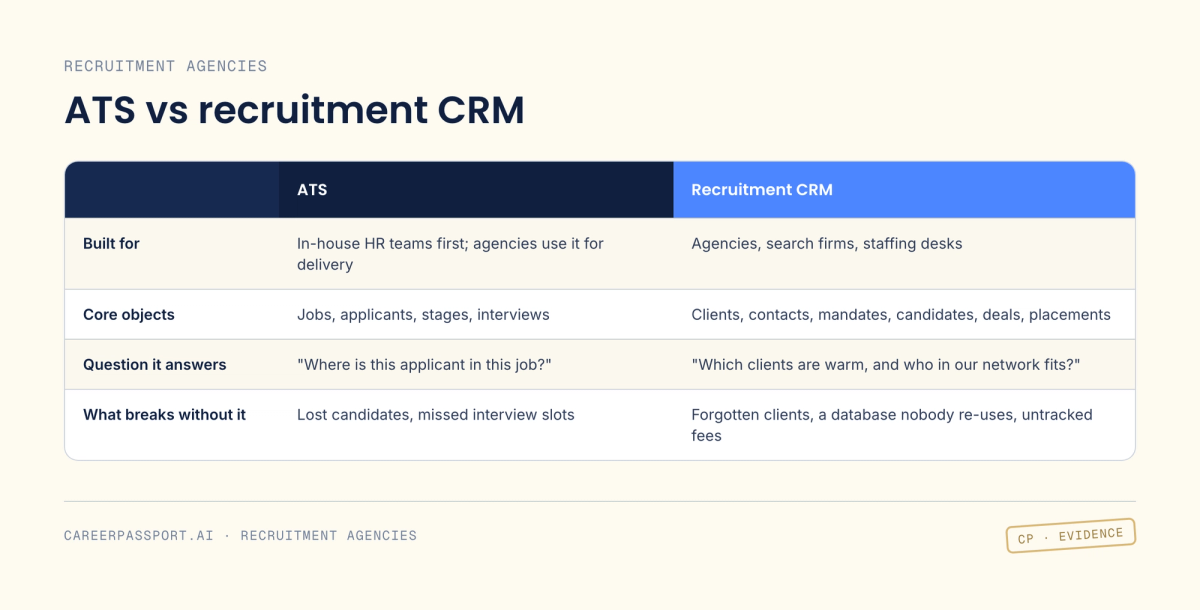
An applicant tracking system (ATS) tracks candidates as they move through the stages of a job. A recruitment CRM (customer relationship management) tracks relationships over time: the clients you sell to, the business development pipeline, and the candidates you want to stay in touch with long after a role closes.
An agency has two customers: the client who pays and the candidate who gets placed. That is why it needs both sides. A search firm running a few senior mandates leans on the CRM side (client relationships, passive candidates). A staffing desk filling volume roles leans on the ATS side (throughput, scheduling). Most agency products now sell both in one box. Recruit CRM, for example, describes itself as an "AI-first ATS + CRM" for recruitment agencies.
What features should a recruitment CRM have for a 10-person agency?
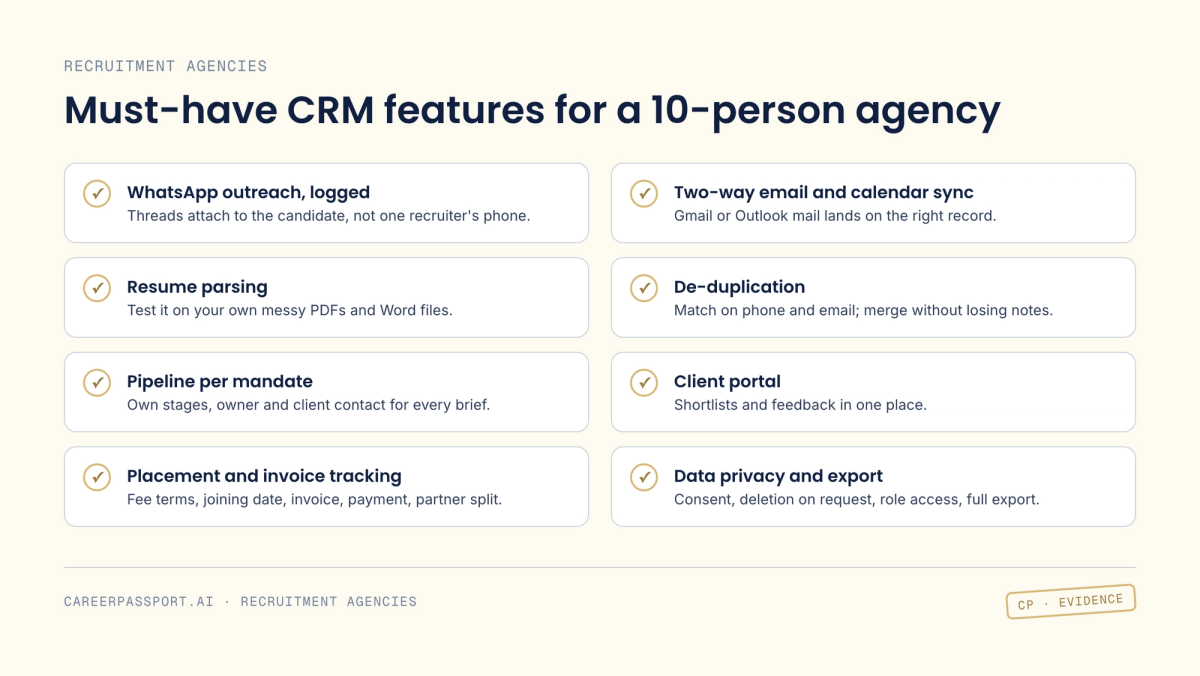
Score each item yes, partly or no. "Partly" usually means a workaround your team will abandon.
- WhatsApp outreach, logged to the record. If your recruiters message candidates on WhatsApp, those threads must attach to the candidate profile, not live on one recruiter's phone. Tools take different routes: Recruitly's WhatsApp integration connects by QR code with no Business API or Meta approval, while tools on the official WhatsApp Business Platform may pass on Meta's charges, which have been per message since 1 July 2025. Ask which route a tool uses and what it costs.
- Two-way email and calendar sync. Emails from Gmail or Outlook should land on the right candidate and client automatically, and invites should sync both ways.
- Resume parsing. Parsing turns a CV into structured fields (name, phone, current CTC, notice period, skills). Test it on your own messy files: PDF exports, Word files, CVs with photos and tables.
- De-duplication. The same candidate arrives from a job board, a referral and a WhatsApp forward. The tool should match on phone and email, flag likely duplicates, and merge histories without losing notes.
- Pipeline per mandate. A mandate is a client's brief to fill a role. Each one needs its own stages, owner and client contact, so a delivery lead can see every open role at a glance.
- Client portal. Clients view shortlists and leave feedback in one place instead of ten email threads.
- Placement and invoice tracking. Record fee terms, joining date, invoice raised, payment received and, if you co-work with other agencies, the partner split.
- Data privacy and export. India's DPDP Rules were notified on 14 November 2025 with an eighteen-month phased rollout. According to AZB & Partners, the main obligations on notice, consent, data principal rights and breach notification apply from May 2027, at the end of that window. Under the Rules, individuals can ask to access, correct or erase their data, and organisations must respond within ninety days. The Act's penalties go up to ₹250 crore for failing to keep reasonable security safeguards. Your CRM should record consent and source, delete a candidate on request, restrict access by role, and export everything (fields, notes, files) in a usable format if you ever leave. Take legal advice on how the Act applies to your agency.
Most of our database never gets searched again. What helps agencies rediscover past candidates?
Talent rediscovery means finding good candidates you already know before paying to source new ones. It fails for three reasons: profiles go stale, the useful context sits in notes and chats that search does not index, and keyword filters miss people who described the same skill differently.
What helps:
- One index for everything. CVs, recruiter notes, email and WhatsApp history, and interview feedback should all be searchable together. A strong candidate who said "call me after Diwali" is only findable if that note is indexed.
- Natural-language search. Also called semantic search, it reads the meaning of a query rather than matching exact words. You type "backend engineers in Pune who led a payments migration, 18–25 LPA, open to hybrid" instead of stacking Boolean filters.
- Freshness signals. Last contacted, last CTC update and last known notice period tell you who is worth a message today.
- Re-engagement at scale. Personalised check-ins to a filtered list, on the channel each candidate answers.
A simple demo test: take three closed mandates where you know who you shortlisted, describe each role in a sentence, and see whether the tool surfaces those people. This is the problem CareerPassport was built around for agencies, so we cover it in more detail at the end.
How do you migrate from Excel and WhatsApp in a week?
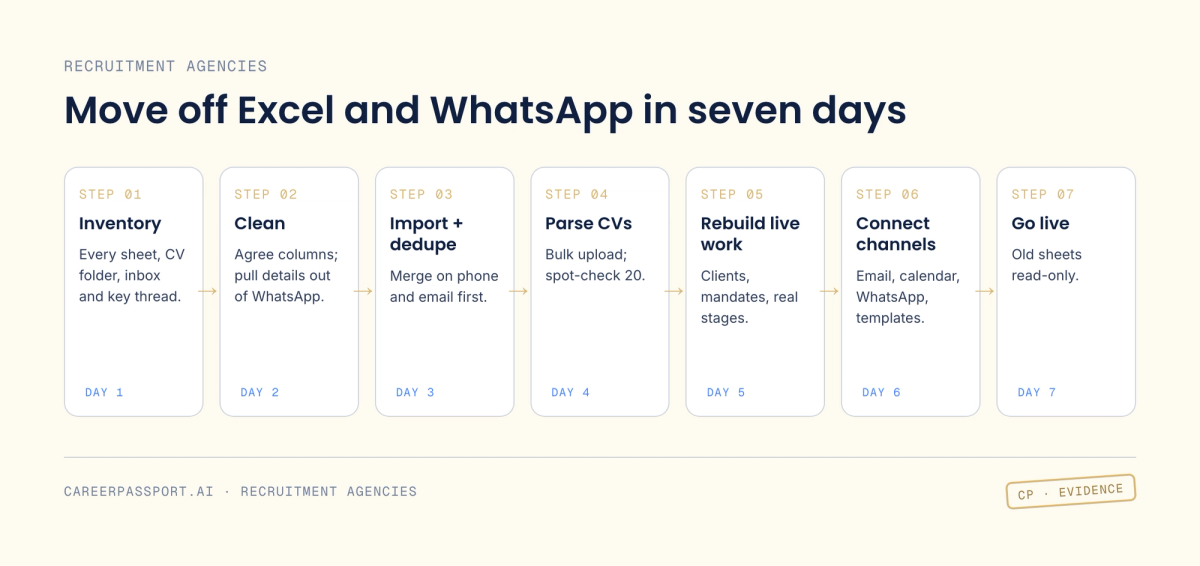
- Day 1: Inventory. List every source: master sheets, recruiter-owned sheets, CV folders, inboxes, key WhatsApp threads. Freeze new sheets from today.
- Day 2: Clean and standardise. Agree columns: name, phone (with +91), email, location, current and expected CTC, notice period, skills, source, owner, consent status. Pull candidate details out of important WhatsApp threads into the same sheet.
- Day 3: Import and de-duplicate. Import into the CRM, then review the duplicate report. Merge on phone and email first.
- Day 4: Parse CVs in bulk. Upload the CV folders and spot-check 20 parsed profiles against the originals.
- Day 5: Rebuild live work. Create clients, contacts and open mandates, with each candidate at their real stage.
- Day 6: Connect channels. Hook up email, calendar and WhatsApp, and load your outreach and submission templates.
- Day 7: Go live. Run a one-hour team session, make the old sheets read-only, and set one rule: if it isn't in the system, it didn't happen.
What should you ask in a recruitment CRM demo?
- Can you import my real spreadsheet now and show me the duplicates it finds?
- How are WhatsApp conversations captured, and which WhatsApp route do you use?
- Show me a parsed CV from my own files, not your sample.
- Can I search my database in a plain sentence, and does that search include notes and messages?
- How do I set up a separate pipeline per mandate with different stages?
- What does my client see in the portal, and can they give feedback there?
- Where do I record fees, invoices, payments and partner splits?
- How do I delete a candidate on request, and is that logged?
- Can I export all data, including notes and files, without raising a ticket?
- What is the full monthly cost for my team, including credits, extra mailboxes and messaging?
What does a recruitment CRM cost? Per-seat vs flat pricing
Per-seat pricing (a price per user per month) is the norm. Prices below are from each vendor's pricing page as we read them on 20 Oct 2026, in US dollars:
- Recruit CRM: Pro $95, Business $135, Enterprise $215 per user per month on monthly billing. Annual billing saves "up to 17%". Each plan includes monthly credits.
- Manatal: Professional $15 per user per month billed annually ($19 monthly), Enterprise $35 ($39), Enterprise Plus $55 ($59).
- Recruitly: "from $25 per user per month".
- Zoho Recruit: the pricing page lists a free plan alongside paid tiers and lets you view prices in INR. We could not read exact paid prices, so check them directly.
To budget, multiply by headcount. For a hypothetical 10-recruiter team, that is $150 a month on Manatal Professional (annual) and $1,350 a month on Recruit CRM Business (monthly), before taxes and add-ons.
Flat or usage pricing (one price per agency, or charges by credits or usage) is less common. Either way, ask about the extras: credits for enrichment or parsing, mailbox limits, migration help, and WhatsApp messaging charges.
Which tools do small agencies commonly evaluate?
Not a ranking, and each line is drawn from the vendor's own website:
- Recruit CRM: "AI-first ATS + CRM" built for recruitment agencies.
- Manatal: AI recruitment software for HR teams and agencies, with a CRM module covering client collaboration and revenue tracking.
- Zoho Recruit: "All-in-one recruitment software for HR teams and staffing agencies."
- Recruitly: positions itself as "the AI operating system for recruitment agencies", with billing that tracks what is invoiced, paid and owed.
Where does CareerPassport fit for agencies?
CareerPassport is positioned differently from a classic ATS plus CRM: it is an agency workflow plus a network. Check it against the checklist above like any other tool. For recruitment partners (solopreneurs, headhunters and agencies), it offers:
- Private, searchable talent intelligence. It brings scattered candidate data from your ATS, Excel, email, WhatsApp, notes and files into one database you can search in plain language. Your personal candidate database always stays private.
- A pipeline with an evidence score. Candidates move through Sourced, Screening, Evaluation and Offer, with an evidence score on each.
- Agentic outreach. For a new mandate, it searches your network, sends personalised outreach over email and WhatsApp, evaluates replies and prepares a shortlist for the client. Sending it is your call.
- Collaboration agreements and payout tracking. Role owner, candidate owner, fee, partner split and payment terms sit inside the workflow, with status tracked from Submitted to Interviewed, Joined, Invoice raised and Payout due.
- A curated network. Work on roles posted by companies and partners, run your own mandates privately, or open selected mandates to the network and set the split.
If that matches how your agency works, book a free 30-minute demo and bring your own spreadsheet and the ten questions above.